
AI has changed the way people approach writing. Instead of starting with a blank page, you can use AI to brainstorm ideas, build an outline, create a first draft, improve your wording, and speed up the editing process.
But getting useful results is not as simple as asking an AI tool to “write an article.” The quality of the result depends heavily on how you give instructions, how you review the output, and how much of your own knowledge and perspective you add.
In this guide, you’ll learn how to use AI for writing step by step, including how to create better prompts, build an article outline, edit AI-generated content, and turn a rough draft into something useful and natural.

What Can You Use AI for in Writing?
AI can help with several stages of the writing process. You do not have to use it to generate an entire article from beginning to end.
Brainstorming Ideas
When you know the general topic but are not sure what to write about, AI can help generate potential angles, questions, examples, and subtopics.
Creating an Outline
AI can turn a broad topic into a logical structure with headings and subheadings. This can make it easier to organize your thoughts before writing.
Writing a First Draft
You can use AI to create an initial draft based on a detailed brief. The first draft can then be reviewed, rewritten, and expanded with your own information.
Rewriting and Paraphrasing
AI can help rewrite complicated sentences, simplify explanations, or provide alternative ways to communicate the same idea.
Improving Clarity and Readability
If a paragraph feels too complicated or repetitive, AI can suggest clearer wording while keeping the original meaning.
Editing and Proofreading
AI can also help identify grammar problems, awkward sentences, repetition, and sections that may need improvement.
How to Use AI for Writing Step by Step
Step 1: Define What You Want to Write
Before opening an AI writing tool, define the purpose of your content.

Ask yourself:
- What am I writing?
- Who is going to read it?
- What problem should the content solve?
- What should the reader learn or do after reading it?
- What tone should the content have?
For example, instead of simply asking:
Write an article about AI writing.
give the AI more context:
Write a beginner-friendly guide about using AI for blog writing. The audience is new bloggers who want to save time without losing their personal writing style. Keep the tone practical, clear, and conversational.
The second prompt gives the AI a much clearer direction.
Step 2: Choose the Right AI Writing Tool
Different AI tools are designed for different writing tasks. Some are general-purpose AI assistants, while others focus specifically on writing, editing, SEO, or content creation.
If you are looking for tools that can help with different stages of the writing process, you can explore our AI Writing Tools guide to compare the types of tools available.
When choosing a tool, consider what you actually need it to do rather than choosing a tool simply because it is popular.
- Do you need help generating ideas?
- Do you need long-form content?
- Do you mainly need rewriting and editing?
- Do you need SEO features?
- Do you need help creating different types of marketing content?
Step 3: Give AI a Clear Prompt
One of the biggest differences between weak and useful AI-generated writing is the quality of the instructions.
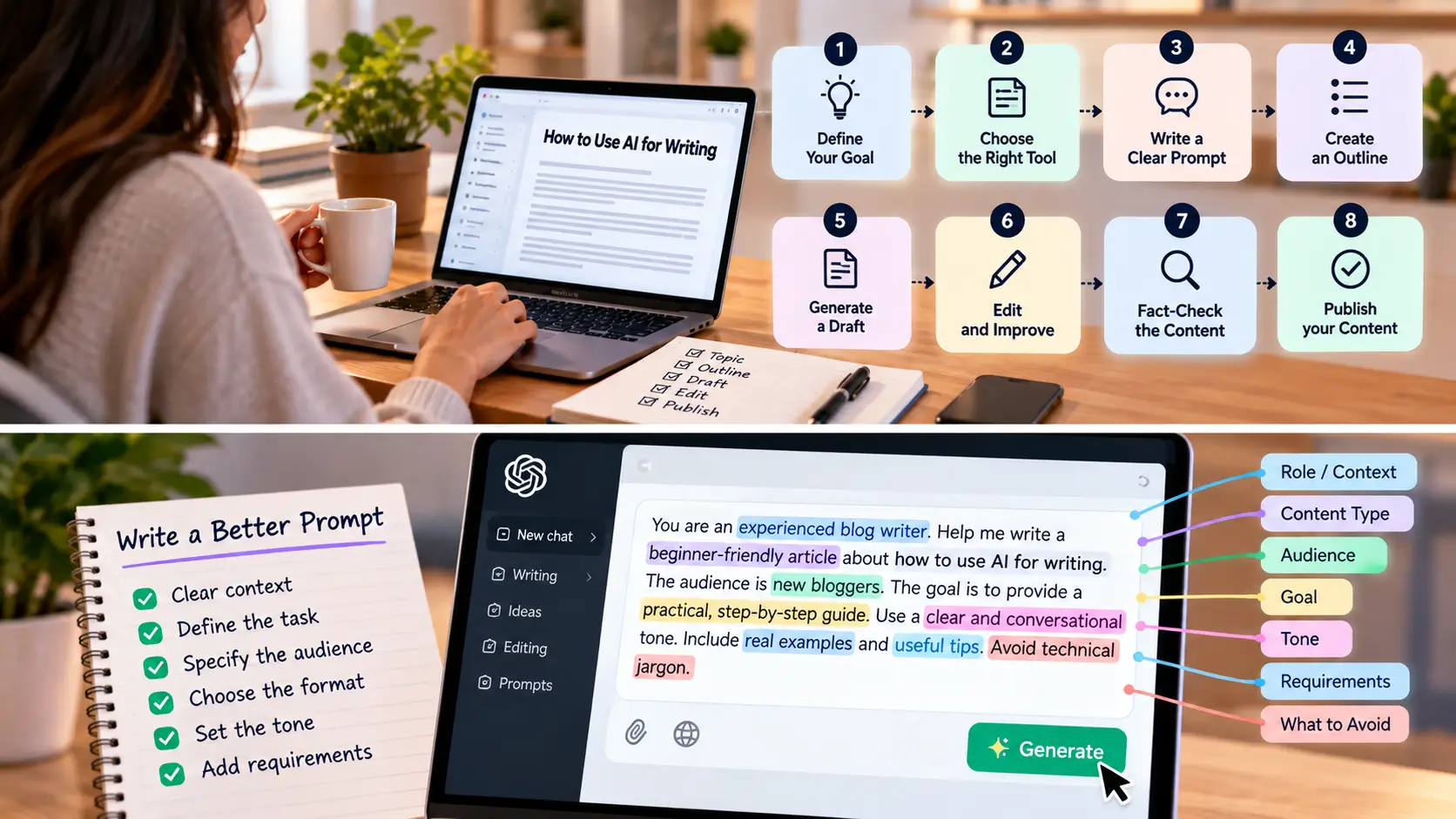
A useful prompt usually includes several elements:
- Context: What is the topic?
- Task: What do you want the AI to do?
- Audience: Who is going to read it?
- Format: What should the output look like?
- Tone: How should it sound?
- Requirements: What should be included or avoided?
Step 4: Ask AI to Create an Outline First
Instead of asking AI to immediately write a complete article, start with an outline.
This gives you an opportunity to review the structure before spending time editing a full draft.
For example, you could ask:
Create a detailed outline for a beginner-friendly article about how to use AI for writing. Include an introduction, practical steps, examples, common mistakes, useful prompts, and FAQs. Avoid unnecessary sections.
Review the outline yourself. Remove sections that do not add value and add anything important that is missing.
Step 5: Generate the First Draft
Once the outline is ready, you can use AI to help create the first draft.
For longer articles, it is often easier to work section by section instead of generating everything in one request.
For example:
- Create the introduction.
- Write the first section.
- Review it.
- Continue with the next section.
- Add examples and specific details.
This gives you more control over the final article and makes it easier to correct problems as you go.
Step 6: Edit the AI-Generated Draft
Never assume that the first AI-generated draft is ready to publish.
Read the content as if you were the target reader and look for:
- Generic statements
- Repeated ideas
- Awkward wording
- Unnecessary introductions
- Unsupported claims
- Missing examples
- Sections that do not answer the reader’s question
You can ask AI to help identify these problems, but you should make the final decisions yourself.
Step 7: Fact-Check the Content
AI-generated text can contain inaccurate or outdated information. This is especially important when your article includes statistics, dates, product features, pricing, technical information, or claims about a company or service.
Check important facts against reliable sources before publishing them.
A simple workflow is:
- Identify factual claims.
- Verify important claims.
- Remove anything you cannot verify.
- Update outdated information.
- Add useful sources where appropriate.
Step 8: Make AI Writing Sound More Natural
One common problem with AI-assisted writing is that the text can feel generic. The solution is not simply to ask AI to “sound human.” Instead, improve the content itself.
Add details that come from your own experience, knowledge, examples, observations, or testing.
You can also:
- Replace generic phrases with specific explanations.
- Remove unnecessary filler.
- Use examples that match your audience.
- Vary sentence length naturally.
- Add your own opinions when they are relevant.
- Rewrite sections that do not sound like your normal voice.
The goal is not to hide the use of AI. The goal is to create content that is genuinely useful and clearly communicates something valuable to the reader.
How to Use AI to Write a Blog Post
Now let’s put the process together using a simple blog-writing workflow.

Step 1: Choose a Topic
Start with a topic that has a clear purpose and a specific audience.
For example, instead of choosing a broad topic such as “AI,” you could focus on “how to use AI for writing blog posts.”
Step 2: Understand the Search Intent
Before writing, think about what someone searching for the topic actually wants to accomplish.
For “how to use AI for writing,” the reader is likely looking for practical instructions, examples, prompts, and a clear workflow.
Your article should therefore focus on helping the reader complete that task rather than spending most of the article explaining what artificial intelligence is.
Step 3: Create the Outline
Build a logical structure around the reader’s questions and the steps they need to follow.
A useful structure might be:
- What AI can help with
- How to choose a tool
- How to create a prompt
- How to create an outline
- How to generate a draft
- How to edit it
- How to fact-check it
- How to improve the final version
Step 4: Generate Each Section
Give AI enough context for each section instead of using the same generic prompt repeatedly.
Include the purpose of the section, the audience, the tone, and any important points that need to be covered.
Step 5: Add Examples and Original Insights
This is where you can make the article much more useful than a generic AI-generated piece.
Add examples, screenshots when useful, lessons from your own testing, comparisons, and specific recommendations.
Step 6: Edit and Fact-Check
Review the article for accuracy, clarity, repetition, and usefulness before publishing.
Step 7: Optimize the Final Article
Once the article is useful and complete, optimize the structure so readers and search engines can understand it easily.
Use descriptive headings, short paragraphs, relevant internal links, useful examples, and a clear page title.
Best AI Writing Prompts to Get Better Results
You do not need complicated prompts to get started. The important thing is to give the AI enough context.
| Task | Prompt Goal |
|---|---|
| Brainstorming | Generate relevant ideas and angles |
| Outline | Build a logical content structure |
| First draft | Create an initial version |
| Rewrite | Improve wording without changing the meaning |
| Editing | Identify unclear or repetitive sections |
| Simplifying | Make complicated text easier to understand |
| Headlines | Generate relevant title ideas |
| FAQs | Find useful questions readers may have |
A Simple AI Writing Prompt Template
You are an experienced [role]. Help me write a [content type] about [topic] for [target audience]. The goal is [goal]. Use a [tone] tone. Include [important points]. Avoid [things to avoid].
Common Mistakes When Using AI for Writing
Asking AI to Write Everything at Once
A single broad prompt often produces generic content. Breaking the work into smaller steps gives you more control.
Using Vague Prompts
If your instructions are unclear, the output may be equally unclear. Give the AI context, audience, format, and requirements.
Publishing Without Editing
AI-generated text should be reviewed before publication. Editing is where you add accuracy, personality, examples, and useful details.
Skipping Fact-Checking
Do not assume that every statement generated by an AI tool is accurate. Verify important information before relying on it.
Removing Your Own Voice
If every sentence sounds generic, the article becomes less distinctive. Use AI to support your writing process while keeping your own perspective.
Using AI Only to Produce More Content
Creating more articles is not automatically the same as creating better content. The goal should be to answer the reader’s question completely and provide useful information.
Can AI Replace Human Writers?
For many writing tasks, AI can make the process faster, but writing is not only about generating sentences.
| AI Can Help With | Human Judgment Still Matters For |
|---|---|
| Generating drafts | Choosing what is worth saying |
| Brainstorming | Adding experience and perspective |
| Rewriting | Maintaining an authentic voice |
| Editing suggestions | Making the final editorial decisions |
| Organizing ideas | Providing original insights |
AI Writing Workflow You Can Use Today
This workflow keeps AI in the role of an assistant rather than making it responsible for every part of the writing process.
Start with a clear goal, give the AI useful instructions, review what it produces, and then add your own knowledge and perspective.
Frequently Asked Questions
Can I use AI to write an entire article?
You can use AI to generate a complete draft, but a draft is not necessarily a finished article. Review, edit, fact-check, and improve the content before publishing it.
What is the best way to use AI for writing?
A practical approach is to use AI throughout the writing process: brainstorm ideas, create an outline, draft sections, rewrite difficult passages, and help with editing. Keep human review and judgment in the process.
How do I write a good AI prompt?
Give the AI clear information about the task, topic, audience, tone, format, and requirements. The more useful context you provide, the easier it is to get a relevant result.
How do I make AI-generated writing sound natural?
Edit generic phrases, remove repetition, add specific examples, vary sentence structure, and include your own knowledge and perspective.
Should I edit AI-generated content before publishing?
Yes. Review the content for accuracy, clarity, originality, tone, and usefulness before publishing.
Can AI writing rank on Google?
Google’s guidance focuses on whether content is helpful, reliable, original, and created primarily for people. The important question is therefore not simply whether AI was used, but whether the finished content provides genuine value to the reader.
Final Thoughts
Learning how to use AI for writing is less about getting an AI tool to do all the work and more about building a better writing process.
Use AI to overcome the blank page, organize ideas, create drafts, improve clarity, and speed up repetitive tasks. Then use your own judgment to verify information, add useful details, and make the final piece genuinely valuable.
If you want to explore tools that can help with different parts of the writing process, visit our AI Writing Tools guide and compare the available options.