
Choosing an AI voice over generator is about more than finding a voice that sounds realistic in a short demo. For videos, YouTube channels, courses, ads, and business content, you also need good pronunciation, natural pacing, useful controls, consistent output, and licensing that matches how you plan to use the voice.
This guide compares the main options by use case, explains what to test before paying, and helps you choose an AI voice generator based on the type of voiceover you actually need.
Quick answer: The best AI voice over generator depends on your use case. Look beyond the demo voice and test your own script for naturalness, pronunciation, pacing, consistency, and usage rights before choosing a tool.
What Makes a Good AI Voice Over Generator?
A strong AI voice generator should produce audio that works across a complete project, not just a few impressive sentences.
Natural Voice Quality
The voice should remain comfortable to listen to over several minutes. Listen for unnatural pauses, repeated speech patterns, and robotic emphasis.
Pronunciation and Clarity
Test proper names, technical terms, brand names, numbers, and words that are commonly mispronounced. A realistic voice is not useful if important words come out incorrectly.
Emotion and Delivery
Different projects need different delivery styles. A tutorial, advertisement, documentary, product video, and story may all require a different tone.
Voice Variety
More voices are not automatically better. What matters is whether you can find a voice that fits your content and stays consistent across your videos.
Language and Accent Support
If you publish in more than one language, check the actual quality of each language rather than relying on the size of the language list.
Control Over Speed and Pauses
Control over pacing can make a major difference in narration. Look for tools that give you enough control to make the voice fit the script.
Voice Consistency
For a YouTube channel, course, or long-term content project, the same voice should remain recognizable from one piece of content to the next.
Commercial Usage Rights
Always check the license for your specific plan. The rights allowed for free users may differ from those available on paid plans.
Pricing and Usage Limits
Compare pricing based on how much audio you actually generate. A low monthly price can become expensive if the plan has strict limits.
Best AI Voice Over Generators at a Glance
| Tool | Best For | Main Strength | Who Should Consider It |
|---|---|---|---|
| ElevenLabs | Realistic narration | Voice quality and expression | Creators and video publishers |
| Murf | Business voiceovers | Voiceover workflow and control | Businesses and professional creators |
| VoiceGenie | AI voice generation | Straightforward voice creation | Creators looking for another option |
This table is only a starting point. The right choice depends on what you are creating and how much control you need.
Best AI Voice Over Generators
ElevenLabs — Best for Realistic AI Voiceovers
Best for: YouTube narration, storytelling, explainers, podcasts, and content where the voice is a major part of the experience.
ElevenLabs is a strong option when realistic delivery is the main priority. When comparing it with other tools, pay attention to how it handles your full script, difficult words, pauses, and changes in tone rather than judging it only from short demo clips.
Good fit: Creators who want a natural-sounding voice and a repeatable narration workflow.
Thinking About ElevenLabs?
See what the platform is like in real-world use, including the features and limitations that matter for voiceover work.
Murf — Best for Business and Professional Voiceovers
Best for: Presentations, training materials, marketing videos, explainers, and other business content.
Murf is more relevant when you need a voiceover workflow that gives you control over how the narration sounds and fits with the rest of the project.
Good fit: Businesses, educators, and creators producing professional narrated content.
Check the current plan details and usage terms before choosing a subscription.
VoiceGenie — Best for Straightforward AI Voice Generation
Best for: Creators who want to experiment with AI-generated narration for videos and other content.
VoiceGenie is worth comparing when you are looking for another AI voice option and want to evaluate the available voices, controls, and workflow against your own content.
Good fit: Creators testing different AI voice workflows.
Want to Test Another AI Voice Option?
Take a closer look at VoiceGenie and see whether its voice generation workflow fits the kind of content you create.
Which AI Voice Over Generator Is Best for Your Use Case?
There is no single winner for every project. The better question is what the voice needs to do.
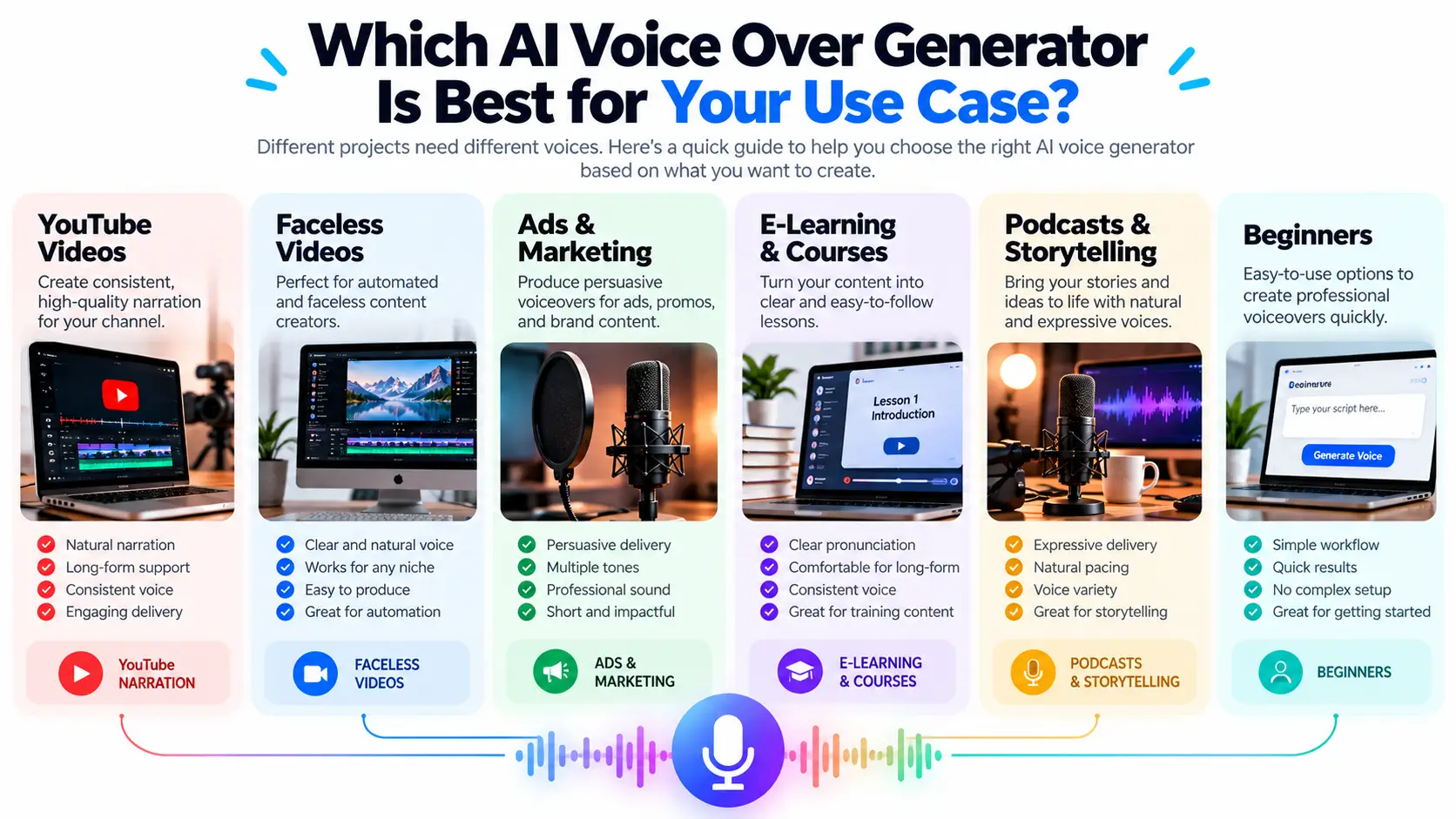
Best AI Voice Over for YouTube
For YouTube, consistency is just as important as realism. You need a voice that can handle your regular video length, pronounce the terminology in your niche, and still sound natural after several minutes.
Best for Faceless YouTube Videos
Faceless channels often rely on narration as the backbone of the video. In that workflow, the voice needs to sound natural enough to hold attention while giving the editor a stable audio track to build the visuals around.
If the goal is to create the entire video around an AI voiceover, our guide on how to make AI videos with voice walks through the process from script to finished video.
Best for Ads and Marketing Videos
Marketing voiceovers often need a different delivery from YouTube narration. Clarity, pacing, emphasis, and the ability to match the brand style matter more than simply sounding realistic.
Best for E-Learning
Training and educational content needs a voice that stays clear and comfortable over longer sections. Pronunciation and consistency become especially important when the same voice is used across lessons.
Best for Podcasts and Storytelling
Storytelling puts more pressure on the voice itself. Variation in pacing and delivery can matter more than having a large voice library.
Best for Beginners
Beginners should prioritize a workflow that is easy to understand and quick to test. There is little value in advanced controls if you spend more time managing the tool than creating the content.
AI Voice Over vs. Human Voiceover
AI voiceovers are faster to produce and easier to scale, but a human voice can add personality and a stronger connection with the audience.
| AI Voice | Human Voice |
|---|---|
| Fast production | More personal delivery |
| Easy to scale | More natural personality |
| Consistent output | More expressive variation |
| No recording setup | Requires recording time |
AI makes more sense when production speed and consistency are important. A human voice may be worth the extra effort when personality, trust, or storytelling is central to the content.
AI Voiceover vs. Text-to-Speech: What’s the Difference?
The terms are often used together, but the intended use can be different.
AI Voiceover
Usually refers to narration created for videos, ads, courses, presentations, podcasts, and other content where the delivery itself matters.
Text-to-Speech
Is a broader category that can include reading text aloud, accessibility, apps, software features, voice assistants, and API-based applications.
When your main goal is video narration, focus on voice quality, delivery, and editing control rather than choosing a platform simply because it has a text-to-speech feature.
How to Choose the Right AI Voice Over Generator
Start With Your Content
Decide what you are actually creating: YouTube videos, ads, courses, social clips, product demos, or something else.
Choose the Right Voice Style
A calm documentary voice and an energetic promotional voice solve different problems. Test several styles instead of choosing the first voice that sounds realistic.
Test Difficult Words
Use names, technical terms, abbreviations, and product names from your real content. This gives you a better picture of the voice’s practical quality.
Test Long-Form Performance
Do not judge a tool from a 10-second sample. Listen to a full paragraph or a complete section of your own script.
Check Usage Rights
Review the current terms for commercial use, monetized content, client work, voice cloning, and other uses that matter to your project.
Compare Pricing by Actual Usage
Think about how much narration you expect to create every month. A plan that looks inexpensive may not be economical at higher volumes.
How to Test an AI Voice Before Paying
Step 1: Use Your Real Script
Do not test only the provider’s sample text. Your own script will reveal problems much faster.
Step 2: Test Two or Three Voices
Compare the same paragraph across several voices so the difference is easier to judge.
Step 3: Test Difficult Pronunciation
Add the names, words, numbers, and technical terms your videos actually use.
Step 4: Listen to a Longer Section
Some voices sound great in short clips but become repetitive after several minutes.
Step 5: Check the Editing Process
See how easy it is to fix one sentence without regenerating the entire recording.
Step 6: Review the License
Make sure the plan you are considering covers how you intend to publish or monetize the voiceover.
How to Make an AI Voiceover Sound More Natural
Write for Speech
Written language and spoken language are not identical. Shorten awkward sentences and remove phrases that sound unnatural when read aloud.
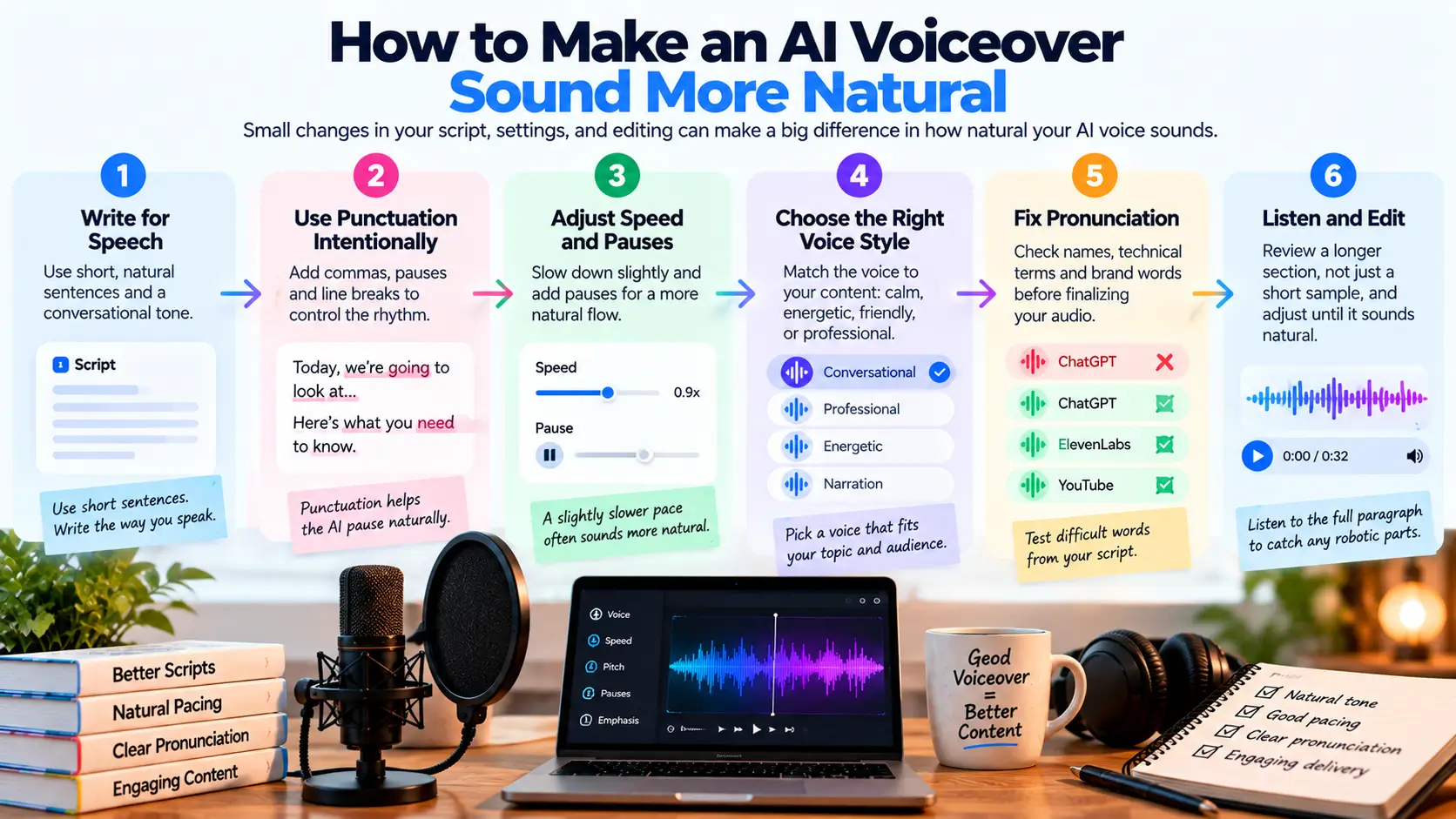
Use Punctuation Intentionally
Commas, periods, and paragraph breaks can influence the rhythm of the generated narration.
Add Natural Pauses
Not every sentence needs to run directly into the next one. Strategic pauses can make the delivery easier to follow.
Fix Pronunciation Before Editing the Video
Correct difficult words in the voice stage so you do not have to rebuild sections of the finished edit later.
Avoid Repetitive AI Writing
A natural voice cannot completely fix a script that repeats the same phrases and sentence structures.
When you are creating the script with AI, it helps to edit the text before sending it to the voice generator. Our guide to how to use AI for writing covers that part of the process.
Common AI Voiceover Problems
Robotic Delivery
A voice can be technically clear but still sound flat. Try another voice or adjust the script and pacing.
Wrong Pronunciation
Always test important names and technical words from your own niche.
Flat Emotion
Some projects need more variation in tone and delivery. Choose a voice and workflow that can support the style you need.
Inconsistent Tone
Changing voices or styles too often can make a channel feel less cohesive.
The Voice Does Not Match the Content
A voice that works for a serious explainer may feel completely wrong for an upbeat short or promotional video.
The Cost Becomes Too High
Usage limits can change the economics of a tool once you start producing large amounts of audio. Check your actual monthly needs before committing.
Best AI Voice Over Generator by Budget
Best Starting Option
For a first test, choose a tool that lets you produce enough audio to evaluate it properly rather than judging quality from a tiny sample.
Best for Regular Creators
If you publish frequently, prioritize predictable usage limits, stable quality, and a workflow that does not slow down production.
Best for Business Use
Businesses should pay closer attention to licensing, collaboration, editing controls, and consistency across different projects.
Best for High-Volume Production
At higher volumes, the pricing model matters almost as much as the voice quality. Calculate the cost based on how much audio you actually generate.
Can You Use AI Voiceovers for YouTube and Commercial Content?
AI voiceovers can be part of many kinds of published content, but the exact rights depend on the provider and plan.
Before using an AI-generated voice for monetized videos, client work, advertising, courses, or other commercial projects, check the current terms that apply to your account.
Also review any specific rules around voice cloning or voices based on real people.
Where Does AI Voice Fit Into a Complete AI Video Workflow?
For many creators, the voiceover is only one part of the process.
A complete workflow may look like:
Research → Choose the topic and angle
Script → Write and edit the narration
Voice → Generate or record the voiceover
Visuals → Add footage, images, or generated scenes
Editing → Sync the visuals with the narration
Publish → Export and review the final video
If video production is the bigger challenge, you can compare more options in our AI video tools guide.
What About AI Tools That Work Offline?
Most cloud-based voice tools depend on an internet connection, but some AI workflows can be run locally or partially offline depending on the software and hardware.
This can matter when privacy, connectivity, or local processing is more important than having access to a large online voice platform.
For a separate look at local AI options, see our guide to the best offline AI chatbots for Android and Windows.
Best AI Voice Over Generator: Quick Decision Guide
| Your Need | Start With |
|---|---|
| Realistic narration | ElevenLabs |
| Business voiceovers | Murf |
| Another AI voice option | VoiceGenie |
| Faceless YouTube | Choose based on narration quality and consistency |
| Commercial projects | Check usage rights first |
| High-volume production | Compare pricing by actual monthly usage |
Frequently Asked Questions
What is the best AI voice over generator?
The best option depends on the type of content you create. Compare voice quality, pronunciation, delivery, control, usage rights, and pricing using your own script.
What is the most realistic AI voice generator?
Realism depends on the voice, language, script, and delivery settings. The best test is to listen to a longer sample using the kind of script you actually publish.
What is the best AI voice for YouTube?
Look for a voice that stays natural over longer narration, handles your niche vocabulary well, and remains consistent across videos.
What is the best free AI voice over generator?
That depends on the limits and quality of the free plan. Check usage limits, export restrictions, watermarks, and commercial rights before choosing based on price alone.
Can I use AI voiceovers commercially?
Often yes, but the answer depends on the provider and the specific plan. Check the current license before using the voice for monetized or client work.
Can AI voice sound like a real person?
Modern AI voices can sound highly realistic in many situations, but quality varies by voice, language, script, and delivery.
Which is better for voiceovers, ElevenLabs or Murf?
Both can be useful, but the better choice depends on what matters most to you. Compare the voices using the same script and focus on naturalness, control, workflow, and pricing for your specific use case.
Can I use AI voice for faceless YouTube videos?
Yes. AI voice can be used as the narration layer in a faceless video workflow. The quality of the script, visuals, editing, and overall content still determines how useful the finished video is.
Final Verdict
The best AI voice over generator is not simply the one with the most voices or the most impressive demo.
Start with your actual content. Test the same script across a few tools, listen for pronunciation and pacing problems, compare the editing workflow, and check the usage rights before paying.
For realistic narration, ElevenLabs is a strong option to investigate. For business-focused voiceovers, compare tools such as Murf. If you want another AI voice workflow to test, VoiceGenie is also worth considering.
Pingback: How to Make AI Videos With Voice: A Step-by-Step Guide - phone labs